How we designed the Arcjet CLI in Go as a stable, defensive interface for humans and AI agents: predictable commands, machine-readable output, strict validation, and confirmation before production changes.
AI agents are increasingly good at editing code, running commands, and stitching tools together. That makes a CLI one of the most important integration surfaces for a developer product. It is also one of the easiest surfaces to get wrong.
A CLI built only for humans can rely on judgment. If a command suggests the wrong thing, a human can notice. If an output table is awkward to parse, a human can scan it. If a destructive command asks "are you sure?", a human understands the risk in context.
Agents do not have that same judgment. They remember old command shapes, hallucinate flags, paste identifiers into the wrong place, misread friendly output, and sometimes keep going after a command clearly failed. The shell is also a weak protocol boundary: everything is text, quoting matters, stdout and stderr have conventions rather than schemas, and every command is one bad argument away from doing the wrong thing.
When we built the arcjet CLI, we treated it as a dual-audience interface: useful for humans, but safe and predictable for agents.
This post covers the decisions we made, why the command surface is an API contract, why we disabled fuzzy suggestions, how we structure errors and confirmations, and how the CLI fits alongside our MCP Server rather than replacing it.
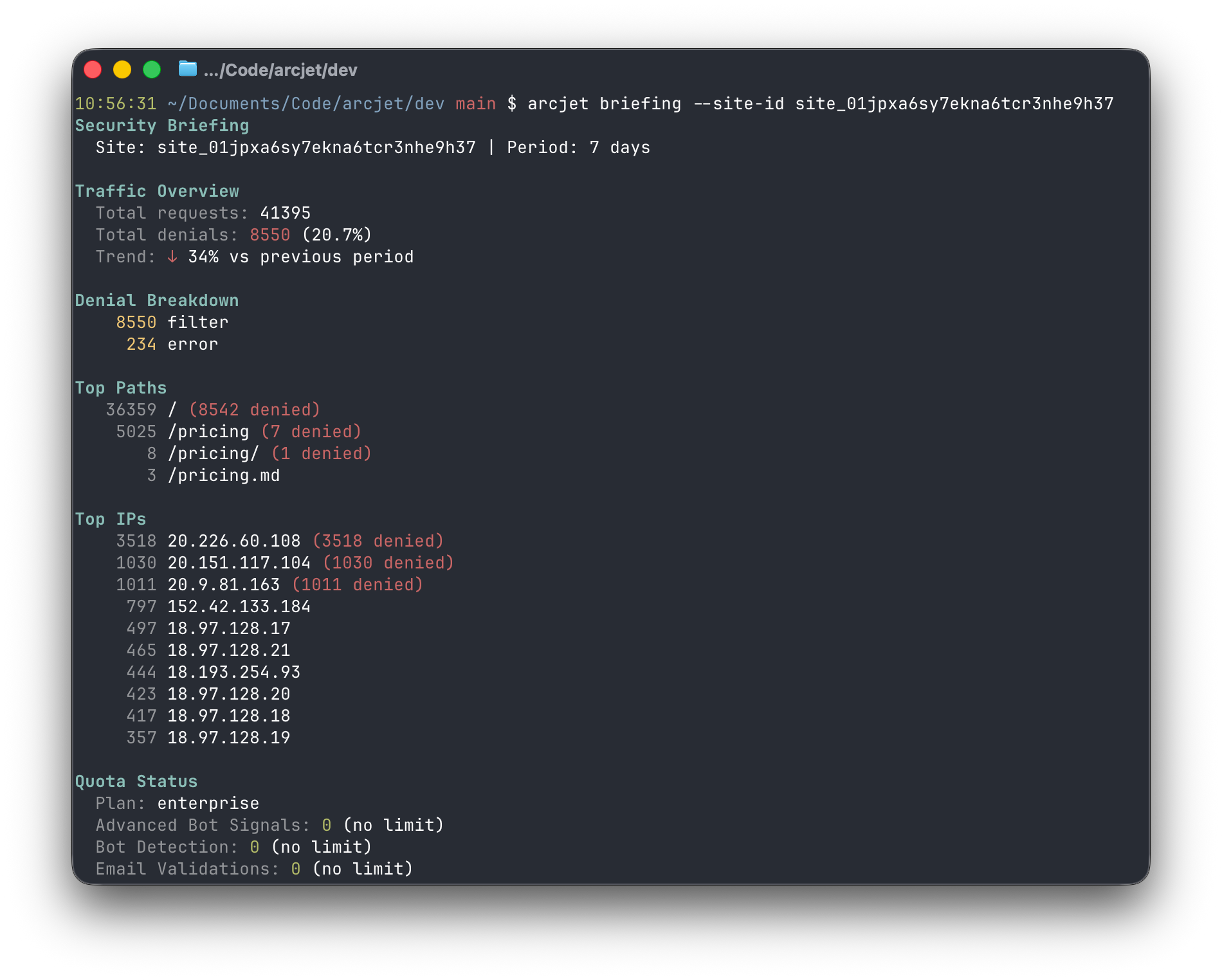
arcjet briefing security briefing for website traffic.
Why a CLI at all?
Arcjet already exposes an MCP server for agent workflows. MCP is a good interface when the client supports it: tool calls are structured, authentication can be handled by the host, schemas describe inputs and outputs, and clients can present confirmation prompts around sensitive operations.
But the CLI is another, important interface that is becoming popular and may end up being more popular than MCP.
Most agents already have shell access. Claude Code, Codex, CI jobs, local scripts, and headless automation can all run a binary. This means the CLI can be integrated into automation and workflows in a way that is more difficult to do with an API or MCP. A CLI also works when MCP transport is unavailable, when a developer wants to pipe output into another command, or when a workflow needs a long-running operation such as watching recent requests.
The most important design constraint is that commands, flags, and output fields become a contract once agents start using them.
Humans can adapt to a rename. An agent may have learned the old flag from a previous run, a local skill, a copied prompt, or stale context. If --site-id becomes --site, the agent may not recover cleanly. Worse, it may try a nearby command and continue with a false assumption about what happened.
After we figured out what the initial user experience was, we froze the CLI API as of 1.0 and all changes afterwards must only be additive. This means:
Add a new command, but do not remove an old one.
Add a new flag, but do not change the meaning of an existing flag.
Add a JSON field, but do not rename one an agent may parse.
Keep old workflows working even when a better workflow exists.
This is stricter than many human-first CLIs need to be, but it matches how agents operate. They cache patterns, they replay examples, they are sensitive to small shape changes, and over a longer period of time the structure may become embedded in the training data.
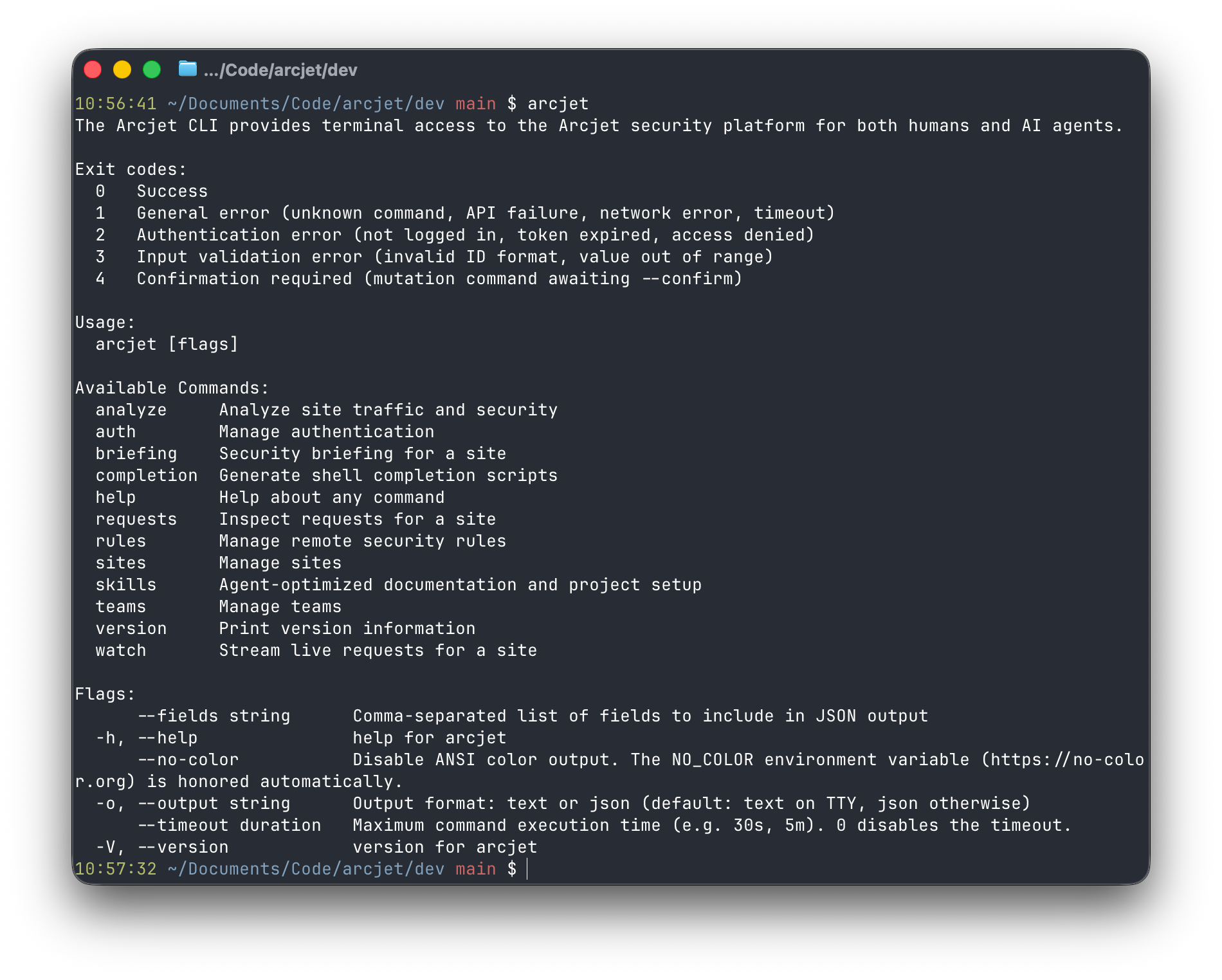
arcjet default output.
Do not guess what the agent meant
Many CLIs try to be helpful when a user mistypes a command:
Unknown command "ruls".
Did you mean "rules"?
For a human, that can be useful, but for an agent, it can be harmful. Fuzzy suggestions create ambiguity. The agent may treat the suggestion as confirmation that the command almost worked, or it may try to recover by invoking a command it did not actually intend to use.
As the CLI is written in Go, we use Cobra as the CLI framework, setting DisableSuggestions option so there is no "did you mean?" path. In the Arcjet CLI, unknown commands and flags are hard failures - the command either exists or it does not. That sounds less friendly, but it is safer. Agents should discover the interface through --help, completions, and skills, not through fuzzy runtime correction.
Make errors parseable
Text errors are fine for humans, but agents need errors they can branch on. We use distinct exit codes:
  0   Success
  1   General error (unknown command, API failure, network error, timeout)
  2   Authentication error (not logged in, token expired, access denied)
  3   Input validation error (invalid ID format, value out of range)
  4   Confirmation required (mutation command awaiting --confirm)
When JSON output is active, errors are emitted as JSON on stderr:
{
  "error": "Not logged in.",
  "code": 2,
  "remediation": "Run 'arcjet auth login' or set the ARCJET_TOKEN environment variable."
}
This gives an agent two ways to reason about failure. It can check the process exit code, and it can parse the structured error body. The wording still matters for humans, but the control flow does not depend on brittle string matching. An agent should not have to grep stderr for "not logged in" to decide whether authentication failed.
Validate before the network call
Agents hallucinate inputs - they paste URLs into ID fields, they use UUIDs where a TypeID is expected, they sometimes include invisible control characters from copied context. We validate those inputs before making an API request.
For example, site and team IDs must use the expected TypeID prefix:
site_2abc123def456
team_2abc123def456
A bare UUID is rejected. A site ID passed where a team ID is required is rejected. Integer flags are range checked.
This is partly about security, but mostly about keeping the agent grounded. If the input is invalid, the fastest and safest answer is a local validation error. There is no reason to wait for an API round trip to discover that --site-id d54ae46d-6088-4a55-b88d-092e194429ae is not a valid Arcjet site ID.
Validation also keeps bad strings away from lower-level URL construction and logging paths. We still validate on the server, but the CLI catches common mistakes where they happen.
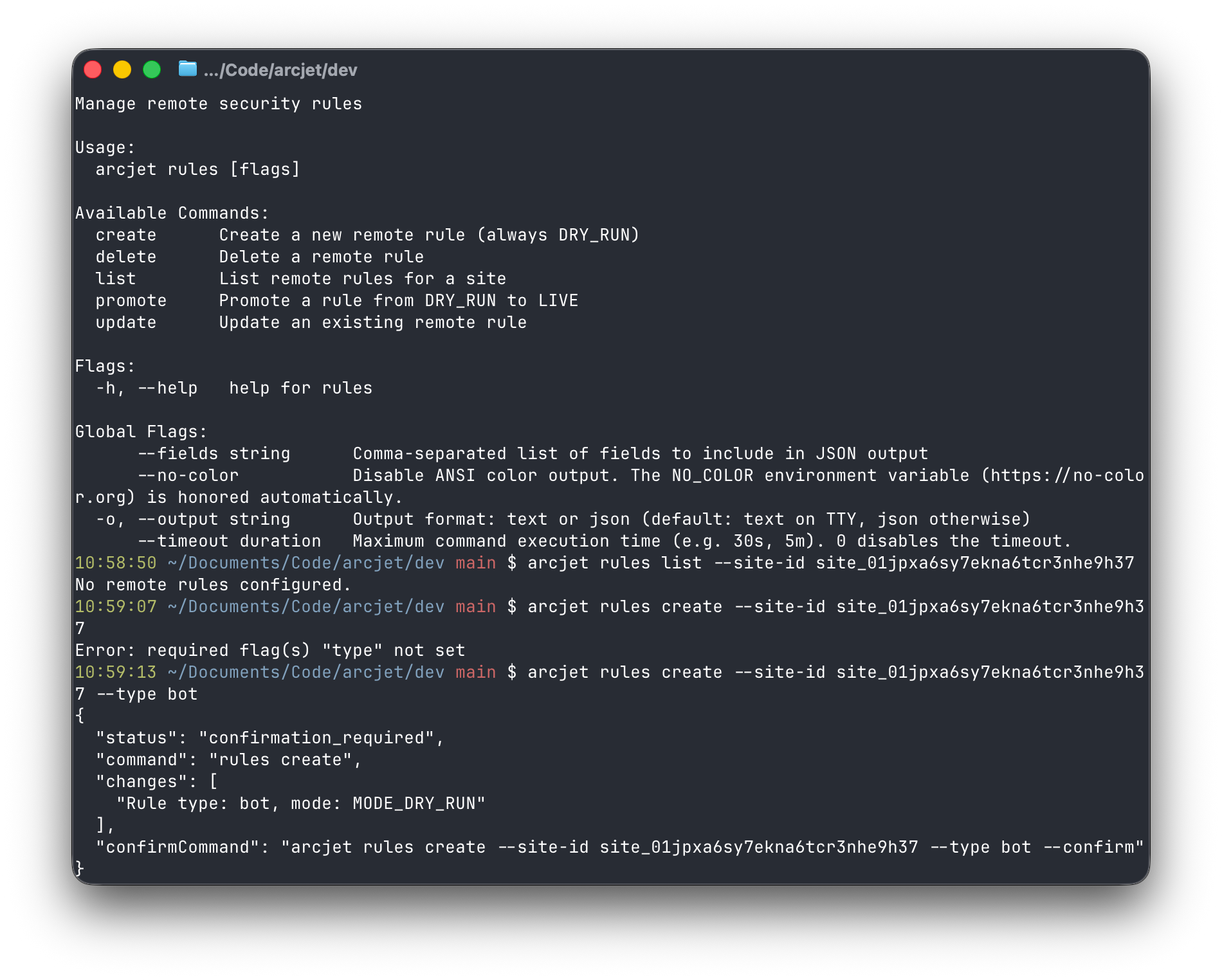
So in the Arcjet CLI mutation commands do not run immediately. Without --confirm, they return exit code 4 and print a JSON confirmation envelope to stdout:
The agent is expected to show the changes array to the user. If the user approves, the agent runs the exact confirmCommand.
This is deliberately not an interactive "are you sure?" prompt. Interactive prompts are awkward for agents because they require a live stdin conversation and often degrade into brittle text automation. The confirmation envelope is a small protocol:
The agent proposes a mutation.
The CLI describes the mutation and refuses to perform it.
The agent presents the proposed changes to the user.
The user approves or rejects.
The agent re-runs the explicit command with --confirm.
That also works in CI and other non-interactive environments. A deployment job can require --confirm explicitly. A local agent can stop and ask the human.
arcjet rules for managing remote security rules.
Output defaults change when stdout is not a TTY
Humans like tables. Agents like JSON. The Arcjet CLI supports both, but defaults matter. When we detect that stdout is a TTY, text output is the default. When stdout is not a TTY, JSON output is the default. That means agents, scripts, and subprocess calls get structured output without remembering to pass --output json.
We also added --fields so callers can limit JSON output to specific top-level fields. Context windows are finite - if an agent only needs id,name, it should not have to ingest a full response.
This is a small design choice, but it matters. A CLI that prints decorative text, progress messages, tables, colors, and warnings into one stream is easy for a human to read and hard for an agent to use. If the CLI detects it is being called programmatically, it should behave like a programmatic interface.
The interface should disclose itself
Agents should not need to search the web to discover basic command usage.
Every command includes a usage shape with realistic examples:
The first line is the contract. The following lines are examples an agent can adapt.
We also generate shell completions and include a skills command that points agents at the canonical Arcjet skill:
npx skills add arcjet/skills
That skill carries the higher-level integration guidance. The CLI remains the execution surface, but it does not try to embed every piece of documentation into the binary.
Authentication has to work without a browser
Human users can authenticate with a browser flow:
arcjet auth login
Agents often cannot. They may be running in CI, a sandbox, a remote VM, or a terminal session where opening a browser is impossible or undesirable.
For that reason, ARCJET_TOKEN environment variable takes priority over stored credentials. This lets an agent authenticate non-interactively without reaching into a local keychain or trying to drive a browser flow. Humans can still use device/browser auth whereas agents get an environment variable.
This is another example of designing the same surface for both audiences without pretending they operate the same way.
CLI and MCP should share the product model
The CLI is not a second product and neither is the MCP server.
Both expose the same underlying Arcjet concepts: teams, sites, rules, requests, guard decisions, security briefings, anomaly reports, and IP investigations. They differ in interface and ergonomics, but they should not invent separate domain models.
That is why we treat our core API as the CLI's contract boundary and keep shared response types in internal packages that can be reused by both CLI and MCP code - internally, both are using the same API. This prevents the common failure mode where a dashboard, CLI, MCP server, and docs all describe the same thing slightly differently.
Tradeoffs
Designing a CLI this way is less forgiving in some places.
No fuzzy suggestions means a typo stays a typo. Structured confirmations mean a human cannot just hammer through a prompt. Strict validation means some values are rejected locally even if a backend would have produced a more specific error. A stable command contract means we carry old shapes longer than we might want to.
There is also more code. Error rendering, JSON mode, confirmation envelopes, input validation, field filtering, token resolution, and usage templates all take work. A human-only CLI could be much smaller. But for an agent-facing CLI, those costs sit at the right boundary. The CLI is the protocol between a probabilistic caller and production security controls.
The confirmation protocol also does not replace authorization. The API still checks permission and the server still validates inputs. The CLI is defense in depth: it prevents accidental or poorly reasoned actions before they leave the machine, and then the backend enforces the real security boundary.
What we learned
The needs of an agent are different from the needs of a human user. We started with a design document that captured what we believe to be the principles of good design for agentic tools (with the belief that most of those principles are also good design for human users), but we also wanted other ways to evaluate how well that design worked in practice.
There are a number of tools intended for this purpose, but we ended up settling on cli-agent-lint. This had the advantage of being a CLI tool itself, so we could tell various LLMs to use it to evaluate our work and reconcile the results with the design principles we had already written down. We didn’t always classify the findings the same way as cli-agent-lint’s authors, but it found a number of things we’d overlooked and the final usability (and quality) of our CLI was undoubtedly improved as a result.
Humans still need the CLI to be pleasant, but agents need it to be unambiguous. That means:
Commands and flags are stable contracts.
Errors have machine-readable structure and distinct exit codes.
We detect the setup and present appropriate output, whether text or JSON.
Inputs are validated before network calls.
Mutations require an explicit confirmation round trip.
Help output includes realistic examples.
Authentication works without interactive browser control.
As AI agents become a normal part of development workflows, CLIs are becoming agent APIs whether we design them that way or not. If a command can change production state, return security data, or become part of a deployment workflow, it needs the same care we give to HTTP APIs and MCP tools.
The shell is a protocol now. It just happens to look like a terminal.
How Arcjet added an optional on-device model backend for sensitive information detection: a pluggable rule interface, deterministic recognizers for structured data, offset reconstruction for token-classification output, and local ONNX inference in the request path.
Reducing WebAssembly bundle size: how Arcjet shrank its Rust bot detector 27% with Aho-Corasick, keeping per-request memory isolation and using Wizer snapshots.