Firebase is back! Whether you’re generating an app with Firebase Studio or using the classic auth and database products, we’re seeing more and more users deploying Arcjet on Firebase to protect their apps.
One of the main problems we see with managed cloud platforms is detecting the client IP. Arcjet’s security SDK is installed as a normal dependency and used like any other library. It helps developers implement bot detection, rate limiting, attack detection (WAF), and email validation. For these to work effectively then we need the client IP to run our analysis.
When a client connects directly to a server, the IP is easy to get. The problem appears when there is something in front of the application: a load balancer, a network firewall, or an edge network proxying requests through to the origin.
When traffic is proxied, the standard approach is to add an X-Forwarded-For header containing the original client IP address. Each proxy should add its own IP to the list so that traversing the list will get you the original client IP. For example (from MDN):
Example of two different values for the X-Forwarded-For header.
The left-most IP address is the client IP, but you can’t trust that value by default. The header can be spoofed by an attacker, which could lead to bypassing rate limiting or other effects. From MDN:
If you know that all proxies in the request chain are trusted (i.e., you control them) and are configured correctly, the parts of the header added by your proxies can be trusted. If any proxy is malicious or misconfigured, any part of the header not added by a trusted proxy may be spoofed or may have an unexpected format or contents
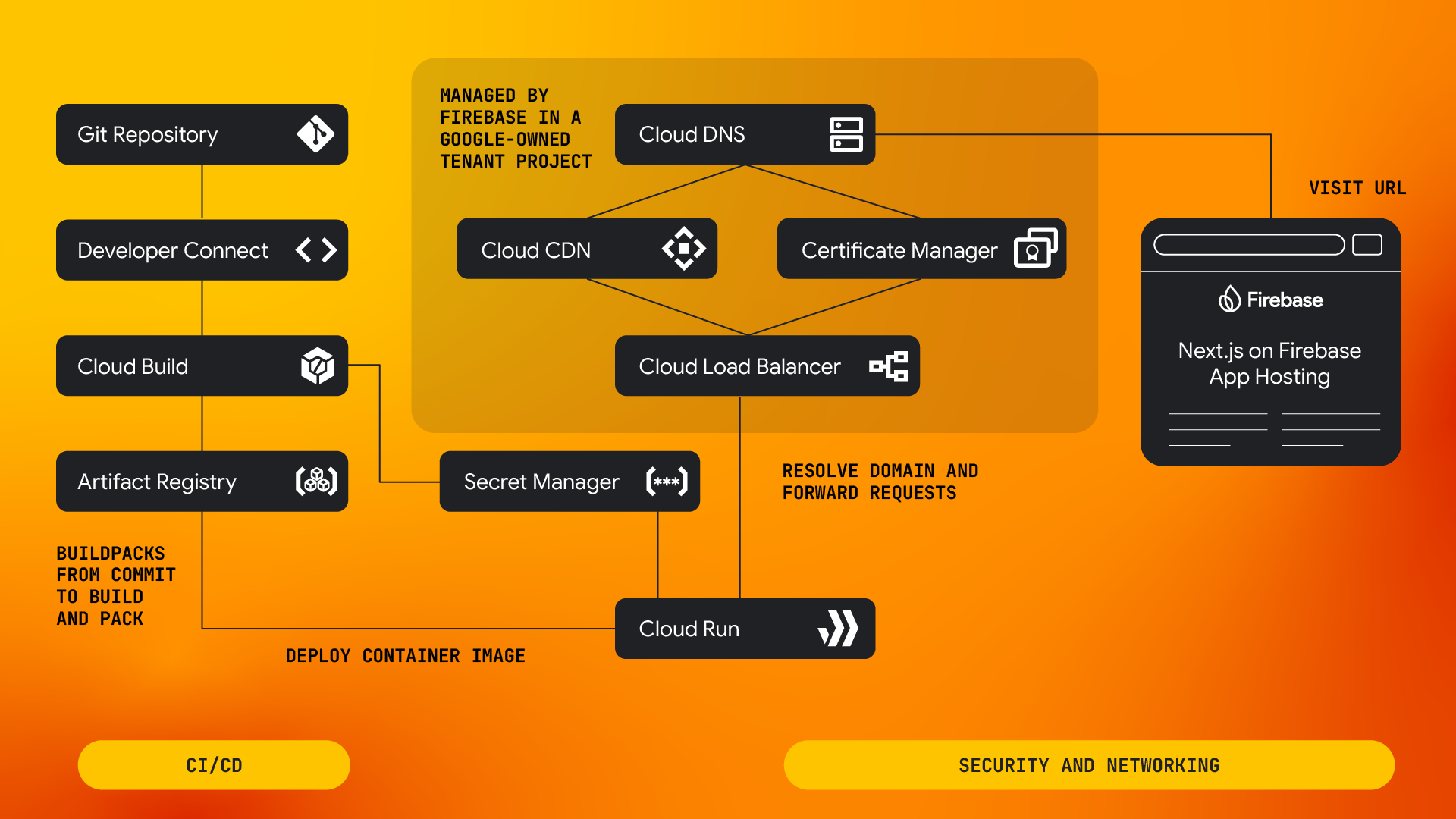
The solution is to provide a list of proxy IP addresses so that, when you parse the header, you know which IPs to trust. This is easy if you control the infrastructure, but becomes more complex for cloud platforms which manage the infrastructure in front of your application. In the case of Firebase, they add a CDN, load balancers, and the proxy infrastructure of the Cloud Run service.
When testing how Arcjet behaves on Firebase, we found two IPs added into the X-Forwarded-For header. Unfortunately, these also changed regularly and without notice.
Firebase publishes all their IPs as part of the Google Cloud Platform ranges, but the list could change as new IPs are used and old ones removed. The Arcjet SDK client can be configured with a proxies option where you can list proxy IPs and/or CIDRs for the networks they’re on. This works well if you control the infrastructure, but it’s a hassle to maintain when the list could change without notice.
const aj = arcjet({
  key: process.env.ARCJET_KEY!,
  rules: [],
  proxies: [
    "100.100.100.100", // A single IP
    "100.100.100.0/24", // A CIDR for the range
  ],
});
Provide a static list of IPs?
To try to solve this, we implemented a prototype to download and parse the list dynamically, but this has a few problems.
The first problem is that we don’t want to download and parse this list on startup in serverless environments. Unlike a long-running server, which could do this once at startup, a serverless function can be recycled frequently - downloading the list every time would add unacceptable overhead. We'd have to make this opt-in so the user can decide the tradeoff.
Alternatively, we could bundle the static IP list in the SDK. Keeping this up to date is the second problem. We would have to track changes and ship updates quickly to ensure our users are always current. Even then it would require developers to keep packages up to date.
const googleResponse = await fetch(
  "https://www.gstatic.com/ipranges/goog.json",
);
const googleBody = (await googleResponse.json()) as GoogleResponse;
const google = googleBody.prefixes
  .map(function (d) {
    return "ipv4Prefix" in d ? d.ipv4Prefix : d.ipv6Prefix;
  })
  .toSorted();
Downloading and parsing the Google IP list.
We would like to do both of these, so building out a system to automatically check for updates and release new packages is something we’re considering for the future. In the meantime we need a faster way to detect the IP.
If only Firebase would provide the client IP directly to us…
IP provided by detecting the platform
Thankfully, they do! Inspecting the headers of requests handled by Firebase showed that a custom header x-fah-client-ip is added to every request. This wasn’t documented anywhere, but Firebase support confirmed that it is indeed the client’s IP.
A custom platform header is useful only if we know which platform we’re running on. If we trust that header without confirming the platform, it could easily be spoofed by a malicious request. However, it’s common for modern cloud platforms to set an environment variable which we can use to detect where the code is running.
On Vercel you can check for VERCEL set to 1. On Fly.io the variable FLY_APP_NAME will be set. On Firebase the variable to check is FIREBASE_CONFIG.
This is all to say that Arcjet now supports applications deployed on Firebase Functions and Firebase App Hosting, the next generation of hosting on Firebase.
Arcjet users can just install the SDK (here’s our example app), use it in their application without additional configuration, and Arcjet will automatically detect the real client IP for you - but now you know what’s going on behind the scenes!