Hallucination or factual error used to be the worst mistake an AI could make when it was just a question-and-answer chatbot. Now chat is just one place AI can start.
We’re rapidly seeing the deployment of AI agents that can take real actions - reading and writing to databases, responding to support tickets, or refunding payments - and those activities can be triggered not just by a chat form, but by replying to texts, managing an inbox, or watching for code commits. Agents are now taking on real tasks across long-running autonomous workflows.
Today, Arcjet is announcing a new product - agent runtime security - to solve each of these. Arcjet agent runtime security helps engineering teams secure the agents they are building whilst providing security teams with the governance and compliance evidence they need to prove it.
Consider the example I introduced in “The two speeds of AI agent runtime security”- an Accounts Payable Inbox that receives emails, parses invoice attachments, validates the details in an internal database, then schedules a payment through the ERP. There are risk points as the agent handles untrusted input, accesses sensitive data via an internal database, then uses tools or an API to access the ERP. Each of these needs security policies applied before and after the risky action - checking the input as well as validating the output.
In conversations with security leaders, three questions keep coming up: Which agents are running? Should this particular action be allowed? What happened, and why? This is what Arcjet is now tackling.
Observe: discover all your agents
Before you can enforce AI security policies you need to know where your agents are, how many are running, and what they’re doing. That’s “observe”. Arcjet now supports ingesting agent activity without any code changes or deploying an agent by ingesting OpenTelemetry events.
Platform and security teams can flip an environment variable or use existing OpenTelemetry observability tooling to send activity directly to Arcjet for real time visualization and analysis. And if you’re using Claude, Arcjet can also pull data from the Claude Compliance API.
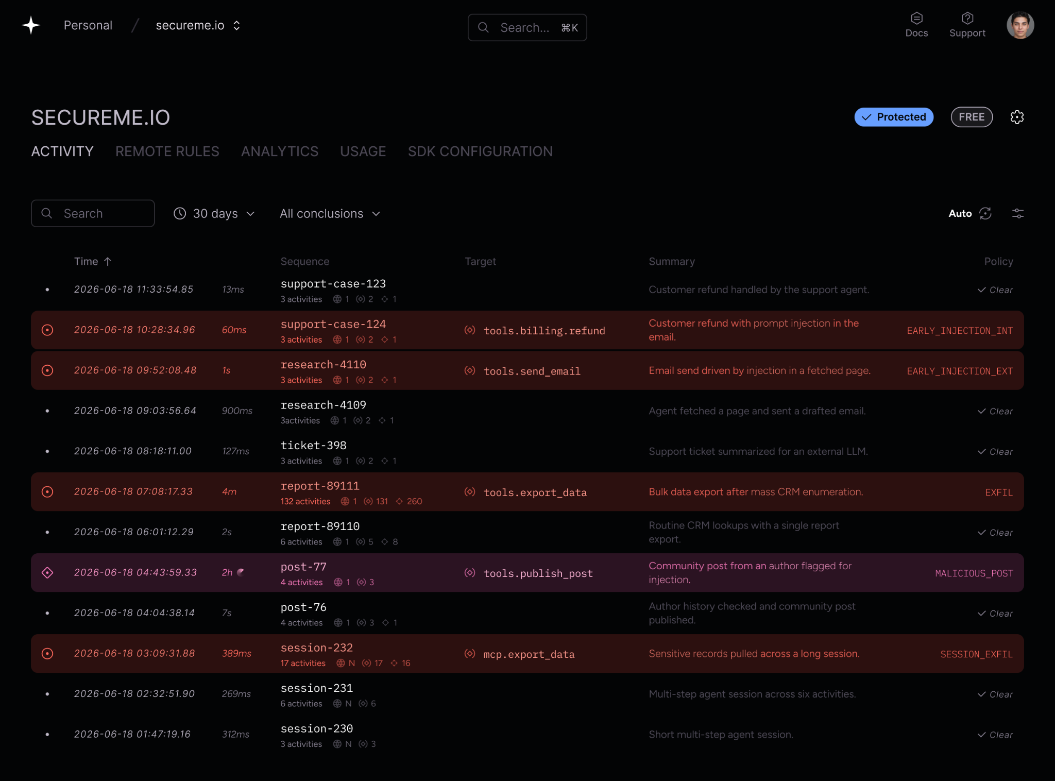
Arcjet agent activity feed. Activities are grouped into sequences for a high-level per-session summary, highlighting risky activity and policy enforcement decisions.
Enforce: apply controls before and after every action
Once you can see every agent and have identified activities across sessions, it’s time to apply security controls. Arcjet allows security teams to define controls such as prompt injection detection, PII and sensitive information leak prevention and redaction, automation and bot detection, and rate limits and quota controls.
Arcjet Guards applies deterministic policies to tools, APIs, database calls, and other input variables. Powered by Rego and Open Policy Agent, security teams can define versioned, immutable policies to build powerful controls around expected actions. Set allowed recipients or prevent attachments for external recipients on an email sending tool, define acceptable bounds for refund values, or define trusted API URLs for web fetch tools.
package arcjet.guard

import rego.v1

deny contains "external-recipient" if {
  parts := split(input.values.recipient, "@")
  count(parts) == 2
  not lower(parts[1]) in input.values.team_domains
}

deny contains "bulk-attachments" if {
  input.values.attachments > 10
}

deny contains "injection-on-destructive-tool" if {
  input.signals.prompt_injection.incoming_message.detected
  input.values.destructive
}
An example Rego policy to prevent external recipients, deny bulk attachments, and apply prompt injection detection to an incoming message. Policies can be defined through the Arcjet Console, MCP, and CLI, for remote enforcement. Controls can also be applied directly in code using Arcjet's native SDKs and AI framework integrations.
Arcjet returns the decision to your application before the action executes. Your code can stop the operation, request human approval, or return a useful explanation to the agent. Applied before and after calls to LLMs, tools, databases, and APIs, Arcjet allows risks to be mitigated before consequential actions, and the results verified before the workflow continues.
Policies can be built using Arcjet’s web UI, API, CLI, and MCP, without needing to redeploy code. For enforcement, Arcjet has native integrations into agent frameworks like Claude Agents SDK, Claude Managed Agents, OpenAI Agents SDK, LangChain, LangFuse, Strands, Mastra, Microsoft’s Agent Framework, and many others.
This deep context means Arcjet tracks the recorded actions, their inputs, and the policy decisions - prompts, tool call parameters, session metadata, and identity.
const arcjet = launchArcjet({ key: process.env.ARCJET_KEY! });

// Wrap your agent tool call
const refund = guardTool(arcjet, refundTool, {
  action: "order.refunded",
  actor: user.id, // from your session, not the model
  inputs: ({ amount }) => ({
    amount: policyInput.server.number(amount),
    role: policyInput.server.string(user.role),
  }),
}); // on DENY, refundTool never runs
Apply policies to tool calls to prevent agents taking unexpected actions. Arcjet native SDKs are available for JS, Python, Go, with integrations for AI frameworks like Claude Agents SDK, Claude Managed Agents, OpenAI Agents SDK, LangChain, LangFuse, and others.
Audit: evidence and proof of compliance
Arcjet collects the evidence you need to provide evidence for security reviews and compliance audits. Although certain controls like PII detection can execute entirely in-process so sensitive data never leaves your environment, Arcjet collects the context of every execution so you can prove what happened and why.
Arcjet can store this for you in the cloud, with options for single-tenant and private VPC deployments. Arcjet is not a SIEM, so you can also send logs directly into your existing detection systems in real-time.
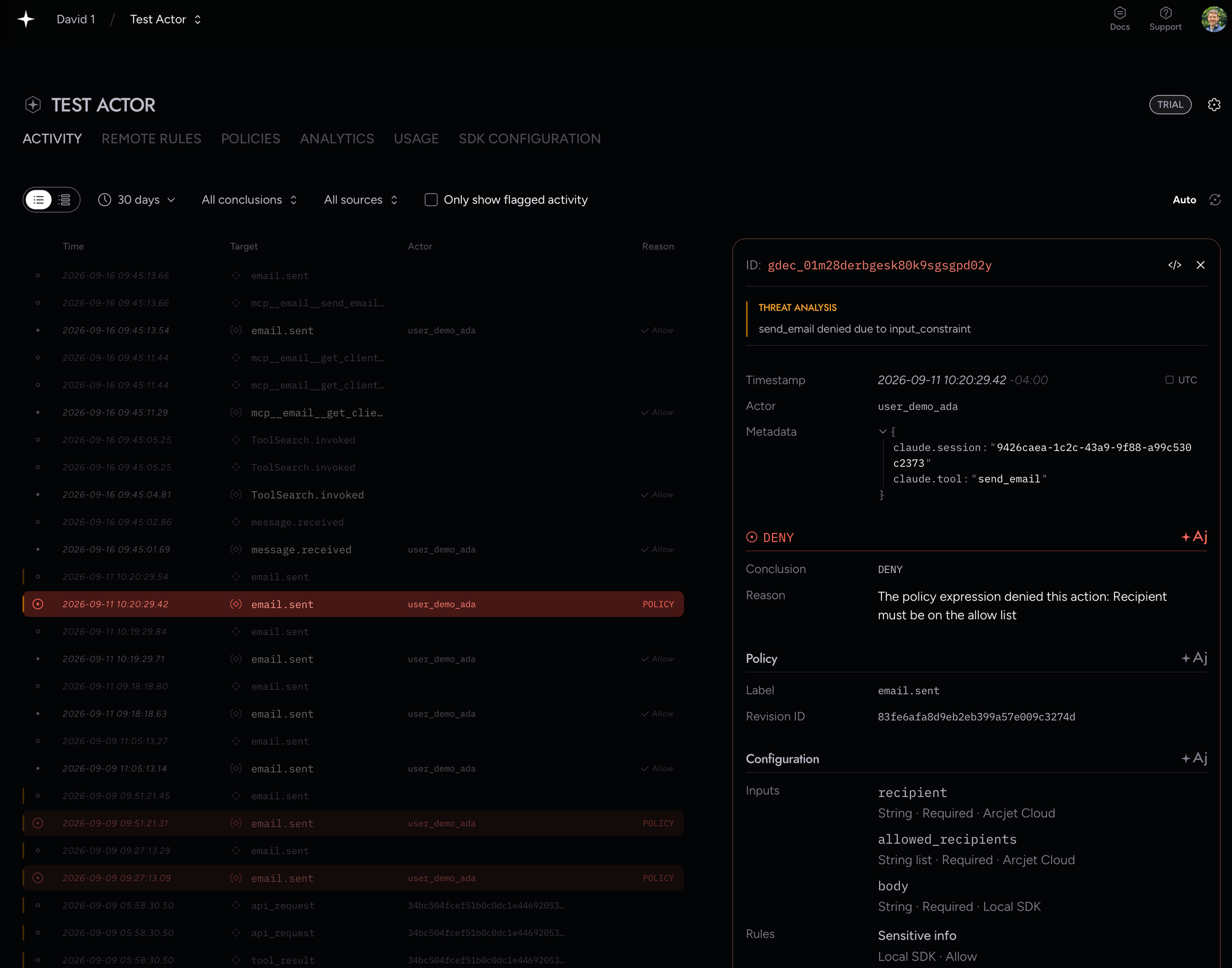
Arcjet Console showing a policy that denied execution due to an input constraint - recipients must be on a specific allow-list. The policy details, including inputs and results, are stored and can be inspected for every activity.
Get started today
Arcjet agent runtime security is available now. Start a free 15-day trial and follow the quickstart to protect your first agent tool and LLM calls, or reach out to schedule a demo.
Arcjet Signals are evaluated without a CAPTCHA and enforced when the request passes through a critical flow. The browser gives us signals. The application gives us intent.
Introducing Arcjet prompt injection detection. Catch hostile instructions before inference. Works with Next.js, Node.js, Flask, FastAPI, and any JavaScript / TypeScript or Python application.